
The whole back office of a nagarpalika, in Gujarati.
Double-entry municipal accounts, cheques and bank reconciliation, budget, statutory registers, grants, advances and deposits, payroll and GPF — one secure web application, ready for audit.
What does it look like?
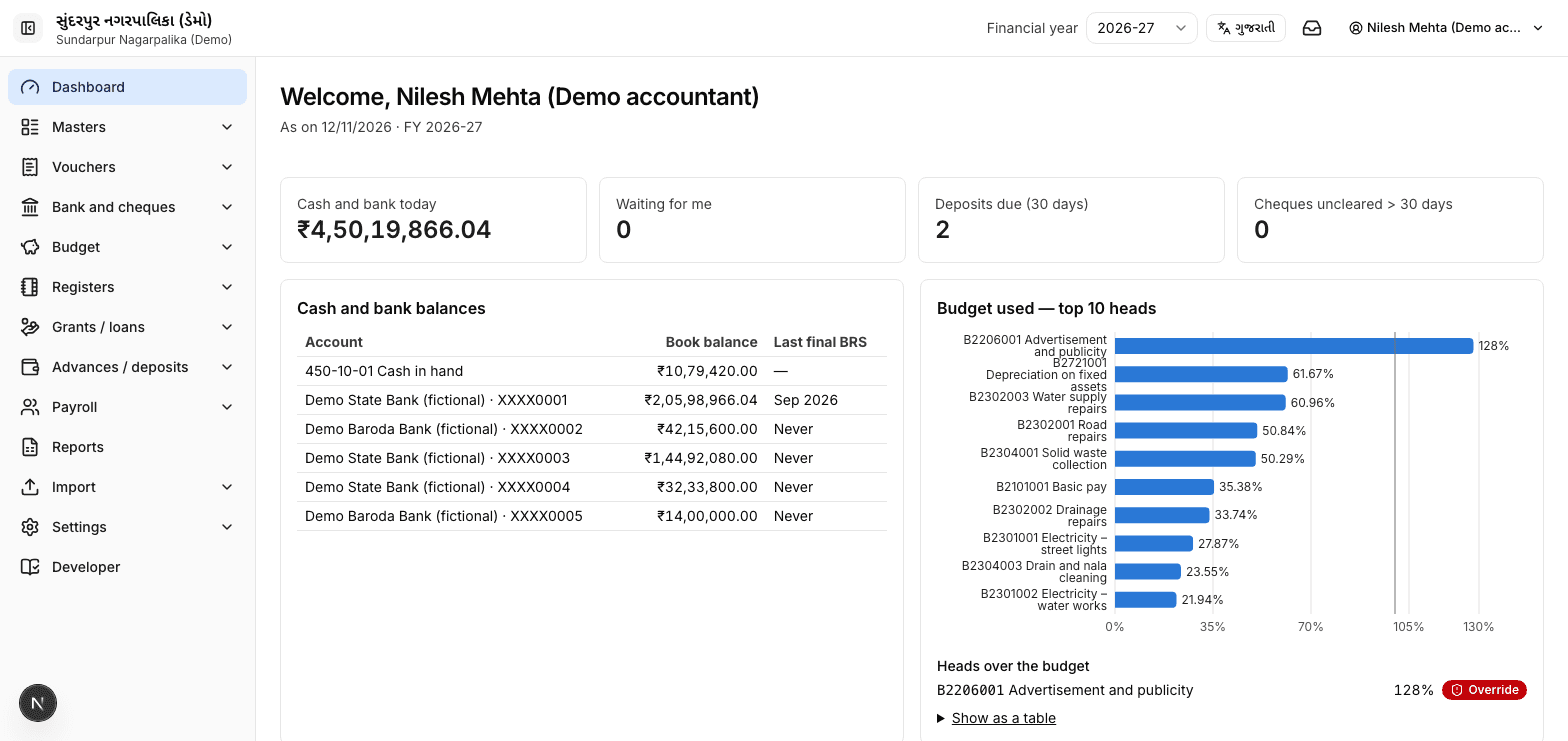
Real screens from the English interface, with demo data only.
What does the suite cover?
Ten modules that share one set of books, so every payment, deduction and salary entry lands in the accounts automatically.
- 01 · Accounts
Accounts
Receipt, payment, journal and contra vouchers with maker–checker–approver workflow and amount limits.
- 02 · Books
Books & final accounts
Rojmel, bank book, ledgers, trial balance, income & expenditure, balance sheet.
- 03 · Bank
Bank & cheques
Cheque printing with amount in words, cheque register, bank statement import, reconciliation.
- 04 · Budget
Budget
Estimates, re-appropriation, budget check on every payment, budget vs actual.
- 05 · Registers
Deductions & registers
Income-tax TDS, GST TDS, labour cess, security deposit, challans.
- 06 · Grants
Grants & loans
Sanction-wise receipts and spending, utilisation certificate draft, loan schedules.
- 07 · Deposits
Advances & deposits
Ageing of advances; EMD and security deposits with refund dues.
- 08 · Payroll
Payroll
Pay matrix, DA, HRA, arrears, pay slips, bank file, salary entry posted to accounts.
- 09 · Provident funds
GPF, NPS, EPF, ESI
GPF ledger with interest and broadsheet; NPS, ECR and ESI files.
- 10 · Year-end
Onboarding & year-end
Excel templates, opening balances tied to the audited balance sheet, year-end close.
Why does it fit a nagarpalika?
It is built around how a Gujarat nagarpalika office already works, not around a generic accounting package.
Gujarati first
Screens, registers and reports are in Gujarati, with English available for every user.
Audit-ready
Posted entries can only be reversed, never edited or deleted, and every change is logged.
Any office computer
Runs in a web browser. Nothing to install on the office computers.
Your data stays in India
Deployed on cloud servers in India (Mumbai region), with daily backups.
How long does implementation take?
About eight weeks from kick-off to go-live, including a parallel run, then annual support.
- Week 0Kick-off
- Weeks 1–3Data and opening balances
- Week 4Setup
- Week 5Training (2 days on site)
- Weeks 6–7Parallel run
- Week 8Go-live
- After go-liveAnnual support
How is it licensed?
Annual subscription per nagarpalika (Class A / B / C / D). Implementation and training quoted separately. Available on GeM.
What support do we get?
Helpdesk Mon–Sat 10:00–18:00 by phone, WhatsApp and email; response within 4 working hours.
Common questions from nagarpalikas
Can we buy it on GeM?
Yes. Trakshym is a registered GeM seller (ID 4LYP260013969435); buyers can create a bid in "Hiring of Agency for IT Projects – Milestone basis" or invite us to a custom bid.
Where is our data stored?
Deployed on cloud servers in India (Mumbai region), with daily backups.
Do our staff need special computers?
No. Any computer with Chrome, Edge or Firefox and an internet connection.
Can you import our old data?
Yes. We provide Excel templates in Gujarati and English and check every row before import; opening balances must match your last audited balance sheet.
Does it replace eNagar?
No. eNagar handles citizen services; this suite runs the accounts and payroll office.
See it working with real Gujarati data.
We show the suite at your office or online, using demo data in Gujarati. Tell us who you are and we will call to fix a time.
- contact@trakshym.com
- Phone
- +91 76008 28787